
Everything in one place. Nothing gets lost.
Most of us lose a surprising amount of the day to switching between tools. Alpha Boffin gives every project its own workspace, so you can stop hunting and get on with the work.
Download Alpha Boffin freeThe short version
Nobody works on one thing at a time. You’ve got client work, your own projects, research and a stream of messages, all at once. The usual fix is another tool: a task manager here, a notes app there, a chat window, a browser, a code editor. You end up with a scattered workspace that quietly eats your focus and your time.
Alpha Boffin goes at the root of it. It doesn’t add one more tool to the pile. Every project gets its own workspace with its own AI, settings, knowledge, memory, skills, apps, secrets and schedule, and you reach all of them from one dashboard. You feel the benefit straight away, and it grows the longer you use it.
The challenge: the hidden cost of switching tools
Moving your attention between unrelated tasks or tools is one of the biggest invisible drains on a working day. Hopping from a code editor to a project tracker to a messaging app and back costs you more than the few seconds each switch takes. You lose the mental state that hard work depends on. Studies suggest it can take around 23 minutes to fully get your focus back after an interruption.
If you’re juggling several projects, the costs stack up:
- You have to remember where each project stands, which tool holds what, and what was decided last time.
- Picking up a paused project means digging through different apps to work out where you left off.
- Tasks, notes, AI help, files and scheduling all sit in separate silos.
- You copy, paste and retype the same information between tools that don’t talk to each other.
- You spend energy deciding which tool to open next instead of doing the work.
The real productivity loss isn’t the seconds it takes to switch tabs. It’s the minutes it takes to rebuild the picture of what you were doing and why.
The solution: one workspace per project
Alpha Boffin starts from a different place. Rather than sitting on top of your existing tools, it gives each project a self-contained workspace, and that workspace holds everything the project needs.
The dashboard shows all your active workspaces side by side as cards. Each card is live. You can see running sessions, finished tasks, active AI conversations and background jobs without leaving the overview. In the screenshot below there are three workspaces: a client invoicing system, a website project and a general assistant. Moving between them takes one click, and each one is exactly as you left it.
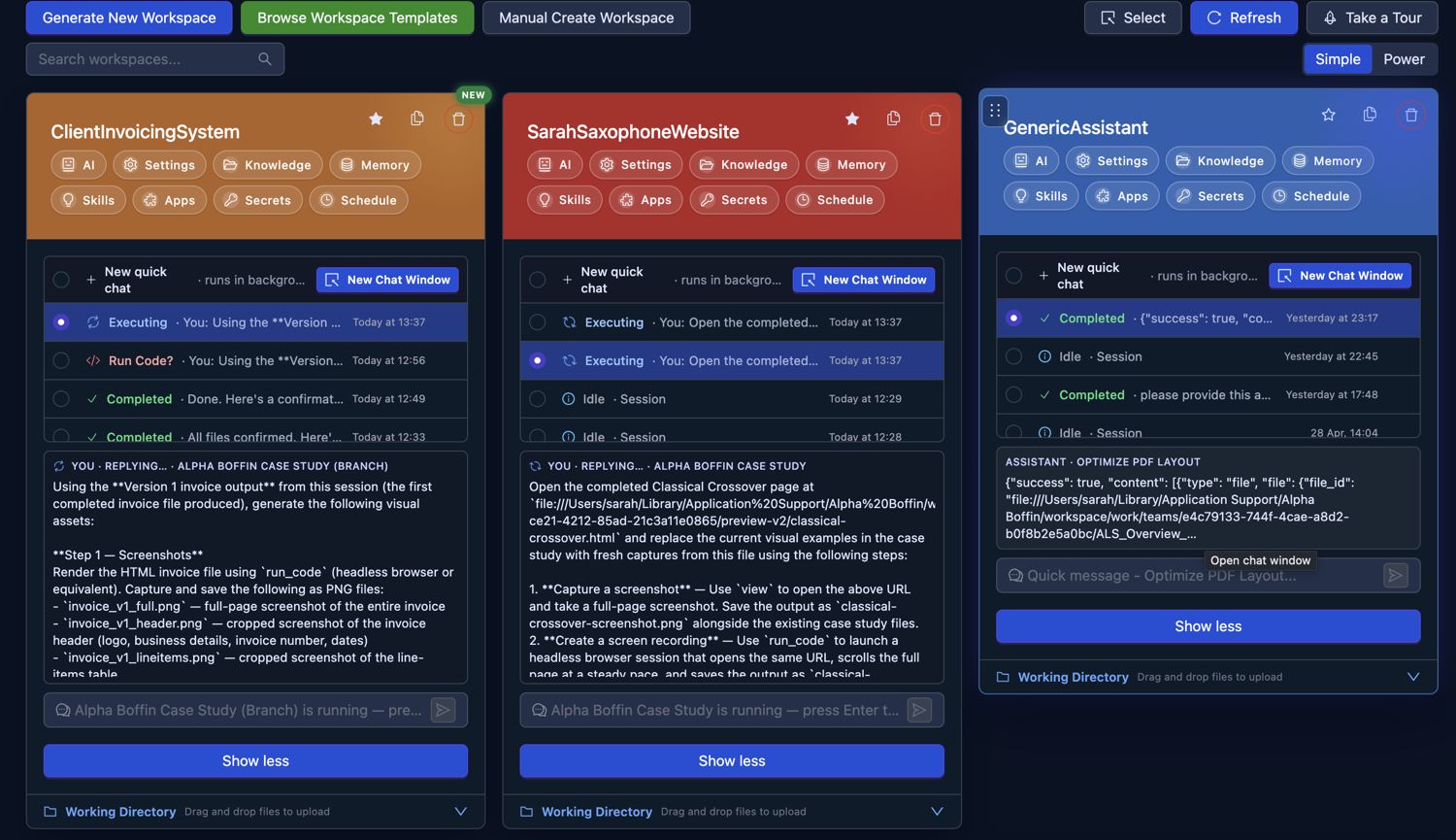
There are two ways to view it. Simple keeps things clean and minimal, and Power gives you full control. You can create a workspace automatically, pick one from a template, or build one from scratch.
What’s inside each workspace
Alpha Boffin is built for running several projects in parallel. These are the main pieces:
- Its own AI. Each project has its own assistant, with its own memory and context. Nothing leaks from one project into another.
- Knowledge base. Everything you know about a project lives inside that project, not in a shared folder of odds and ends.
- Memory. Alpha Boffin remembers earlier decisions, preferences and house rules, so you don’t have to brief it again.
- Skills. Automations and special abilities sit in the workspace that needs them.
- Apps and secrets. Connections and passwords are kept per project, so they stay tidy and secure.
- Schedule. Timelines and recurring jobs sit right next to the work they belong to.
- Background tasks. Long jobs carry on in the background while you get on with something else.
- Live session feed. Each workspace card shows what’s running, finished or idle, as it happens.
- New chat window. Start a fresh conversation in any project without losing the ones already there.
- Working folder. Drag and drop files into a workspace so the assets stay with the work.
The results
People who move their project work into Alpha Boffin tend to describe the same change. They spend more time doing the work and less time managing where it lives.
- More focus time. Deep work runs for longer with fewer interruptions, because everything you need is in one place.
- Quicker restarts. A paused project takes seconds to pick back up. The AI context, session history, files and notes are all where you left them.
- Less to hold in your head. There’s no map of which tool holds what. The workspace is the one place to look.
- More projects at once. Three, five or more projects stay manageable without the drop in quality that usually comes with multitasking.
- Faster handovers. New collaborators and new AI sessions get up to speed from the workspace’s knowledge base and memory, with no briefing from scratch.
- Calmer workflows. Code builds, document generation and API calls run in the background, so they don’t grab your attention.
“I’m not switching between a task manager, a notes app and an AI tool fifteen times a day. Every project has its own space, and I can see all of them on one screen. It’s changed how much I get done.”
An Alpha Boffin user
Conclusion
Having one app for every problem is a leftover from how software used to be built. Alpha Boffin is built around how people really work: across several projects, with context that has to stick around, and with an AI that knows the difference between your invoicing system and your creative website.
By bringing AI, knowledge, memory, skills, apps, scheduling and files into one workspace per project, Alpha Boffin doesn’t just cut down on tools. It removes the reason you were losing time in the first place.